Automations
Roofing change order catch from photos: a Friday list of extras with no signed CO
A Friday email lists jobs where photos show extra work with no signed change order, so extras get billed before final invoice.
The short answer
Change-order work done on site but never written up now shows on a Friday list before the final invoice. A scheduled AI task reads the photos and job notes already in AccuLynx or JobNimbus, compares them to signed change orders on file, and emails you only the jobs where the pictures show extra work with no CO. Nobody walks photo galleries looking for chimney flashing that never got paperwork, and work the crew already did stops leaving free.
What it costs you now
Here is how it usually goes. The crew replaces a roof. While they are up there, they fix chimney flashing the homeowner pointed out, add an ice-and-water course the inspector wanted, and swap a vent. Someone snaps photos. Someone writes a note. Nobody opens a change order. The final invoice matches the original scope.
Someone is supposed to catch it:
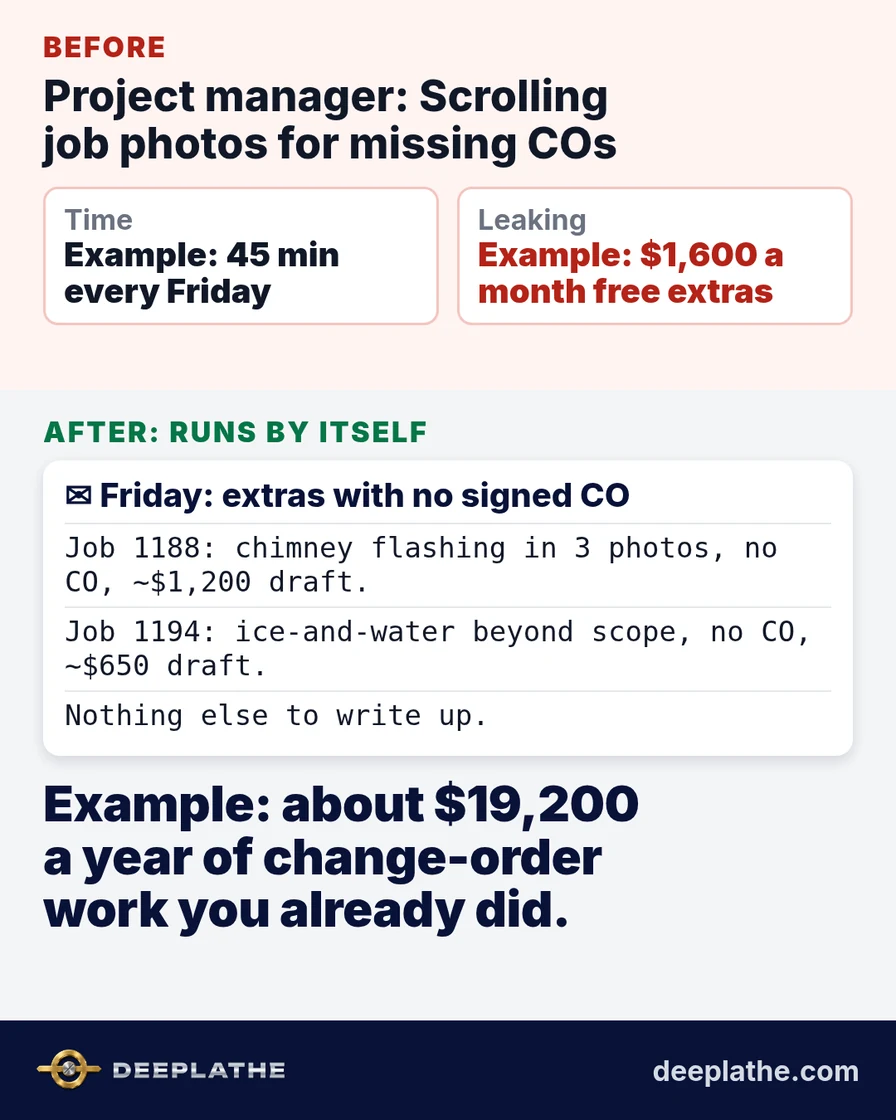
- Example: the project manager spends about 45 minutes every Friday scrolling job photos and texts looking for extras that never got a signed CO.
- Example: when that walk is skipped, 2 missed change orders a month averaging $800 walk out: about $1,600 a month, roughly $19,200 a year, of work already done.
- Example: the homeowner also learns extras are free, so the next "while you're up there" request gets bigger.
Fall closeout makes it worse. Oct and Nov 2026 are when roofers finish the season's jobs and paperwork piles up. That is exactly when a missing CO is most likely.
The cost is not only the missed dollars. A homeowner who got free chimney work tells the neighbor. Your next bid on that street is judged against a freebie you never meant to give. Catching the paperwork the same week keeps the price honest for everyone.
One more cost owners skip past: attention. Every unfinished chase sits in the back of your head during estimates and family dinners. A list that arrives on schedule clears that loop. Photo evidence is already the strongest proof you have. The gap is paperwork speed, not whether the work happened.
What runs by itself
The job is a watcher on three things you already have:
- Job photos and captions the crew uploads in AccuLynx, JobNimbus or your job software.
- Job notes and customer texts tied to that job.
- Signed change orders (or the empty change-order folder) for the same job.
Every Friday morning it decides one thing: do the photos or notes show work that is not on the original scope and has no signed CO on file? If yes, that job goes on the list with the photo evidence line, a rough dollar from your price list, and a drafted CO for you to send. If everything matches paperwork, silence.
It never sends a CO to the customer without your OK. It never changes the final invoice on its own. It only turns "I should have written that up" into a Friday list.
This runs as a scheduled task in ChatGPT connected to your job software email or Drive export, or as a Zapier or Make AI step on new photos and notes. We can set this up for you inside the tools you already use.
For why this is different from pasting photos into a chat every night, see automation vs a chatbot.
Example: what lands in your inbox
Illustrative sample of the Friday email:
Missing change orders (2):
Job 1188 Ortiz: chimney flashing visible in 3 photos, note "homeowner asked while up there," no CO on file. Suggested CO ~$1,200 from price list. Draft ready.
Job 1194 Haley: ice-and-water course beyond scope in photo captions, no CO. Suggested CO ~$650. Draft ready.
Job 1170: photos match signed COs. (no action)
You review two drafts, send them before final invoice, and the extras get paid.
Owners do not need another dashboard. They need the exception list. That is why the output is an email or a folder drop, not a login. If nothing needs you, you hear nothing. Silence means the watcher found a clean set.
The time and money math
Assumptions, all labeled as an example. Swap in your own numbers:
- Example: 45 minutes every Friday walking photos, about 3 hours a month.
- Example: 2 missed change orders a month at $800.
- Example: PM wage of $35 an hour on those 3 hours.
Time back: the Friday photo walk drops to a few minutes of approving flagged drafts. Over a year that is about 36 hours back.
Money effect: revenue from work already done. Example: 2 × $800 × 12 = $19,200 a year. The 36 hours at $35 is about $1,260 of PM time freed for estimating. One caught chimney flashing often pays for months of the setup.
To pressure-test the math on your books, see how to measure AI ROI in a small business.
Fall closeout is when good crews get sloppy on paper. Everyone is tired, the weather window is closing, and the next roof is already staged. The photo gallery fills up. The change-order folder does not. A Friday list that only shows the mismatches respects that reality instead of asking the PM to re-read every gallery like it is January.
Where it goes wrong (limits)
It only sees photos and notes that reach the job record. A picture on a foreman's personal camera roll never counts until it is uploaded.
It suggests scope gaps; it does not practice law or insurance adjusting. Storm work and carrier rules still need your normal process.
False flags happen when a photo is of existing damage you documented for the claim but did not perform. You mark "documentation only" once and those stop.
Price suggestions need your price list. Missing SKUs fall back to a default you set; you still approve the number.
What if it still doesn't work for you?
If your PMs already write a CO before the crew leaves the roof, the list will stay empty and that is success. If your software has no photo gallery, email photo dumps into a shared job folder first. If after a month every flag is wrong, tighten the rules to only caption keywords you choose. You lose a setup afternoon, not a new seat.
Built inside the tools you already use
Deeplathe builds this watcher inside AccuLynx, JobNimbus or the job software and email you already run, so crews keep using the same photo upload. You decide what counts as extra work, what may be drafted and what never sends. Other jobs that run this way are at /solutions.
Questions owners ask
What does it cost to run?
A paid ChatGPT plan with connectors or a Zapier or Make plan on top of software you already pay for. One recovered CO usually covers months of that.
Will it work for a crew my size?
Best for roofing companies running several jobs a week with photo documentation. A two-person crew that invoices from the truck the same day may already catch extras.
What if it invents work that was not done?
It only flags what photos and notes already show. You approve every CO. Nothing reaches the customer without you.
Is customer photo data safe?
It uses the connections and permissions you grant. More in is customer data safe with AI tools.
Does the crew need a new app?
No. They keep uploading photos the way they do today. The watcher reads what is already there.
Sources
- Zapier: AI by Zapier integrations: AI steps that can read and classify notes and image captions from connected apps.
- Zapier: ChatGPT scheduled tasks: recurring Friday checks without opening a chat each time.
- Levelset: construction payment and change documentation basics: general education on why written change paperwork matters on construction jobs (not legal advice).
Keep these
The working rules
Change-order work done on site but never written up now shows on a Friday list before the final invoice.
Floor vote
Where are you with this job?
One vote per device. Change it any time.
Loading votes…
Field check
Field check
Four questions. Honest answers. No score sent anywhere but this page.
01 / 04
Can you name the one job this piece is for, in one sentence?